Privacy & Security carries two groups and four controls. It is a short screen that does more than its length suggests. The exclude list keeps chosen senders out of processing entirely. Unknown Senders keeps mail stored and searchable but leaves it out of your briefings. A third control decides whether you can share an item you pick out with Brief staff, so they can fix what went wrong.
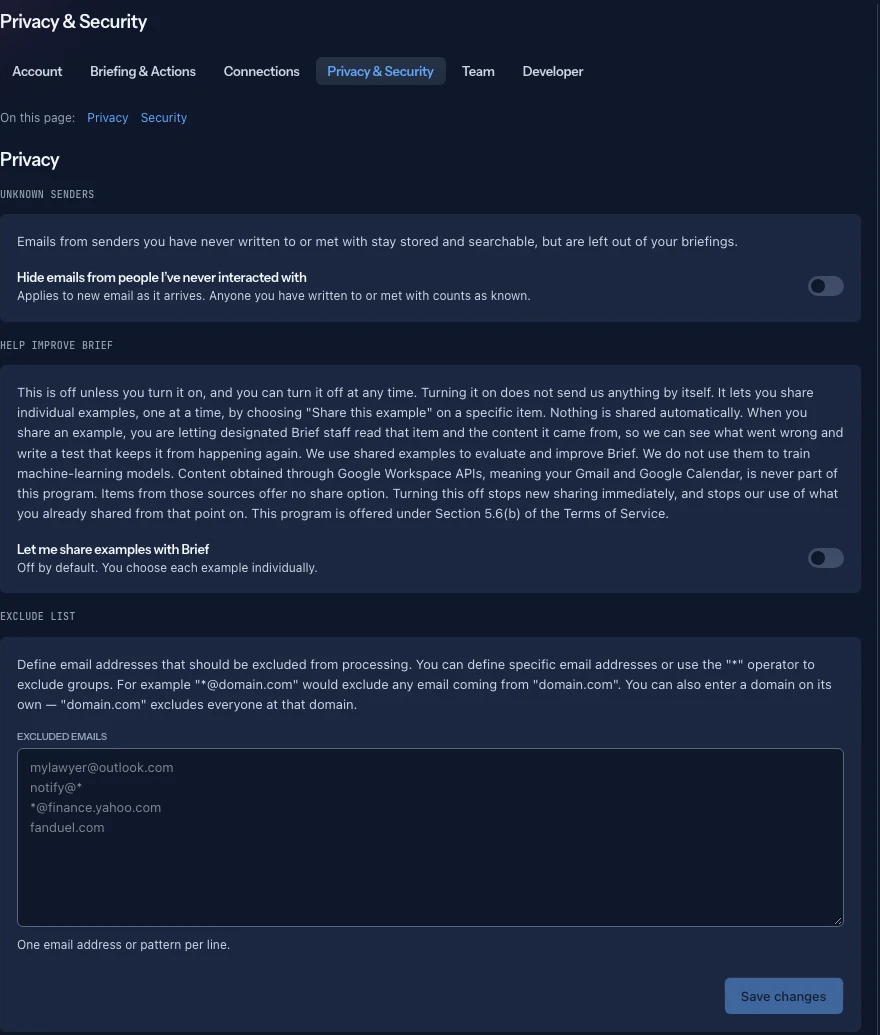
This is the screen, not the posture. For how Brief encrypts and isolates your data and which models see what, read Privacy and security.
Unknown Senders
One toggle: Hide emails from people I've never interacted with.
What it does is narrower than "hide", and the card is precise about it: "Emails from senders you have never written to or met with stay stored and searchable, but are left out of your briefings."
So nothing is deleted. A cold outreach email is still in Brief and still turns up in search. It just does not take up room in your morning read. Brief decides "never interacted with" from whether you have written to them or shared a meeting.
Turn it on if your brief keeps leading with people you have never met. Leave it off if unsolicited mail is part of your job, such as inbound recruiting, vendor pitches or press, because then those senders are the work.
Help improve Brief
One toggle: Let me share examples with Brief. It is on during the Open Beta, and you can turn it off at any time.
It sends us nothing on its own. Sharing happens one item at a time, and only when you answer a question that tells you it will.
Where you share
Dismiss a task suggestion, commitment or open question and a short notice comes up with Undo. Where Brief can record why, it asks underneath and offers five answers: Trivial, Wrong, Not mine, Duplicate, Already done. Answering is optional. Skip closes the question without recording a reason or sharing anything, and the item stays dismissed.
The five answers point at different problems. Trivial says Brief read the item correctly and it was not worth surfacing. Wrong, Not mine and Duplicate say it should never have been pulled out at all. Already done says it was right but late.
If you are in the program and that item can be shared, the question says so: "Designated Brief staff will read this item and its source, and automated checks may review them, so we can fix the problem. We never train models on it." Picking a reason then shares that one item. If the question does not say it, nothing is shared, and your answer only records why you dismissed it.
What happens to what you share
Designated Brief staff read the item and its source, and automated checks may review them, to work out what went wrong, then write a test that keeps it from happening again. The fix is usually a wording change in the instructions that tell Brief what counts as a task or a commitment. We never use shared examples to train models. All of it happens within Section 5.6(b) of the Terms of Service.
Turning the toggle off stops new sharing immediately, and our use of what you already shared from that point on.
Exclude List
The sharper instrument. Excluded emails takes one address or pattern per line, and these are excluded from processing rather than filtered out afterwards.
The syntax is more capable than it looks:
- A full address, such as
noreply@example.com, excludes that sender. - A wildcard, such as
*@domain.com, excludes everyone at that domain. - A bare domain, such as
domain.com, does the same thing. - A local-part wildcard, such as
notify@*, excludes that mailbox name at every domain, which is the one that catches the same robot across a dozen vendors.
The best use is machine traffic: build notifications, monitoring alerts, receipts, calendar spam. Anything that arrives constantly, is never a commitment, and is never a decision.
Take care with a bare domain that also carries real correspondence. Excluding bigcustomer.com to silence their ticketing robot also excludes the person who signs the renewal.
Sessions
Every signed-in device, the current one carrying a This device tag, and two ways out.
Log out ends the session you are using. Log out everywhere ends every other one and leaves you signed in here. Both confirm first, and the confirmation is what spells out which is which: "Log out this session?" against "Log out of all other devices?"
The second is what you want after losing a laptop or phone, or signing in on a machine that was not yours. It is also the right move if you ever suspect your Google or Microsoft account was compromised. End the Brief sessions, then fix the account at the provider, since that is where Brief's sign-in actually lives.
If a session simply looks unfamiliar, check it against how you use Brief before assuming the worst: a phone browser, a work laptop, and a home desktop are three sessions from one person.